BSA E-Filing rejections, or what compliance teams call kickbacks, are one of the most common yet least discussed friction points in SAR programs. They eat analyst time, threaten filing deadlines, and if they keep happening, they catch an examiner's eye.
Most kickbacks aren't random glitches. They trace back to a handful of predictable causes: missing critical fields, mismatched identifiers, or narratives that don't hold up to scrutiny. This article covers why SAR filings get kicked back, how to diagnose the exact cause, step-by-step fixes, when a rejection signals a bigger program problem, and how to stop the cycle from repeating.
Key Takeaways
- Most kickbacks come from missing fields, bad DCN/BSA IDs, NAICS or RSSD mismatches, or thin narratives
- Nearly every rejection is fixable once you pin the exact cause; blind resubmits almost always fail again
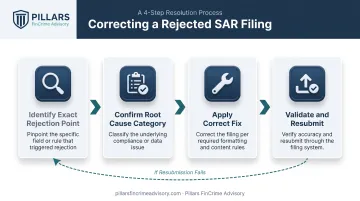
- Fix path: find the rejection point, confirm the cause, apply the fix, validate, then resubmit
- Recurring kickbacks across filers usually signal a training or software gap that needs a program-level fix
What Is a SAR Filing "Kickback"?
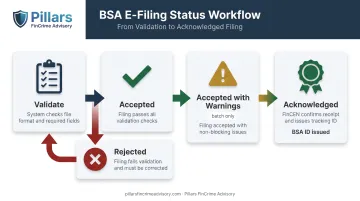
FinCEN doesn't officially use the word "kickback." Its systems track statuses like Received, Accepted, Accepted with Warnings, Rejected, and Acknowledged.
Compliance teams use "kickback" as shorthand for any point where a filing gets sent back—a hard rejection, a validation error before submission, or an internal QA reviewer flagging an already-accepted SAR for deficiency.
Filings move through several status checkpoints:
| Stage | What It Means |
|---|---|
| Validate | Pre-submission check for formatting and required fields |
| Accepted | BSA E-Filing has completed validation |
| Accepted with Warnings | Batch filings only; processed, but errors need correcting after acknowledgment |
| Rejected | Failed validation, invalid report version, or missing filer role |
| Acknowledged | FinCEN confirms receipt and issues the BSA ID |
Each kickback carries a real cost:
- Consumes analyst hours re-diagnosing a filing that should already be done
- Risks blowing past the 30-day filing deadline
- Looks like an exam finding when the same issue repeats across multiple SARs
FinCEN's October 2025 joint FAQ guidance on structuring, continuing activity, and no-SAR documentation signals where the agency's attention is headed: fewer, higher-quality filings instead of a flood of boilerplate ones. That makes getting kickbacks under control more relevant than it's been in years.
Common Reasons SAR Filings Get Kicked Back by FinCEN
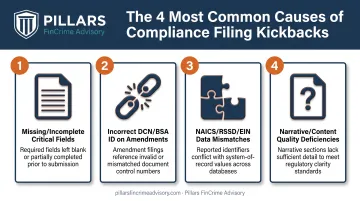
Most kickbacks fall into four predictable buckets: incomplete fields, identifier errors, data mismatches, and narrative gaps. Here's what each looks like in practice.
Missing or Incomplete Critical ("Asterisked") Fields
Every SAR form marks certain fields with an asterisk. Those fields are mandatory, even when the answer is genuinely unknown.
Symptoms:
- The SAR fails pre-submission validation
- BSA E-Filing flags a blank field the filer assumed was optional
Likely cause: A critical field was left blank instead of marked "Unknown," or the filing software didn't prompt for it. FinCEN's SAR FAQ states filers must either provide the requested information or affirmatively select "Unknown." Leaving it blank isn't a shortcut.
Incorrect or Missing DCN/BSA ID on Amended Filings
Amending a prior SAR requires linking it to the original. Get that link wrong, and the amendment either bounces or attaches to the wrong report.
Symptoms: An amended SAR is rejected, or FinCEN associates it with the wrong original filing.
Likely cause: The filer doesn't have the prior Document Control Number or BSA ID on hand, or skips the required convention of entering 14 zeros when that identifier truly isn't available.
NAICS Code, RSSD, or EIN Data Mismatches
Institution identifiers cause more kickbacks than most filers expect, especially in batch submissions.
Symptoms:
- Batch filings rejected during system validation
- A SAR flagged for institution identifier inconsistency
Likely cause: Batch filers entered a NAICS code outside FinCEN's approved list. Discrete filers pick from a built-in drop-down, so this mainly hits batch submissions. The RSSD or EIN for the filing institution or branch may also fail to match FFIEC records. Verifying RSSD through FFIEC's institution search before filing catches this early.
Narrative or Content Quality Deficiencies
This one's different: the SAR isn't rejected by the system. It's accepted, then flagged internally by QA, an examiner, or through law enforcement follow-up.
Symptoms: A technically "Accepted" SAR draws questions because the narrative reads as vague or boilerplate.
Likely cause: The narrative skips one of the five Ws and How (who, what, when, where, why, and how), or Item 29 is miscoded. Entering "$0" for amount involved is a common mistake; the correct move is checking "Amount unknown" or "No amount involved" instead.
How to Fix a Rejected or Flagged SAR (Step-by-Step)
Resubmitting a rejected SAR without knowing exactly why it bounced usually produces a second rejection. The fix only works if you identify the precise rejection point, confirm the cause category, apply the correct fix, and validate before resubmitting.
Step 1: Identify the Exact Point of Rejection
Start with the BSA E-Filing confirmation or rejection message. It names the specific field or reason. Then figure out where in the process things broke down:
- Did the filing never reach "Accepted" status?
- Was it accepted, then flagged later during acknowledgment or a QA/exam review?
Document the answer. Pre-submission validation errors and post-acceptance flags call for different fixes, and mixing them up wastes a filing cycle.
Step 2: Confirm the Root Cause Category
Before touching the filing again, sort the issue into one of four buckets:
- Technical or validation error
- Data or identifier mismatch
- Narrative or content quality issue
- Filing software limitation
Rule out simple user error first: an expired PIN or a timed-out session can look like a data problem but isn't one. Skipping this step is how filers resubmit the same bad information twice.
Step 3: Apply the Correct Fix Based on the Identified Problem
Technical/validation error. Blank critical fields, formatting issues, and incomplete sections are the usual culprits. Complete every critical field (or mark "Unknown"), click "Validate" before submitting, and correct Item 29 per FinCEN's rules. Never enter "$0" as a placeholder.
Data/identifier error. Wrong DCN/BSA ID, incorrect RSSD/EIN, or a non-approved NAICS code will trip this. Pull the correct prior DCN/BSA ID from the original acknowledgment (or use 14 zeros if it's genuinely unavailable), verify RSSD through FFIEC's lookup tool, and confirm the NAICS code against FinCEN's approved batch list.
Narrative/content quality issue. The system accepted the filing, but QA, an examiner, or law enforcement flagged it. Rewrite the narrative to cover the five W's clearly, and make sure the suspicious activity characterization checkboxes match what the narrative describes.
Filing software limitation. The software won't let you enter known data into a required field. File a discrete filing as a workaround, then submit an amended SAR once the software issue is resolved.
Step 4: Correct, Validate, and Resubmit
Once the fix is applied, close the loop properly:
- Complete the corrected or amended SAR in full, noting the correction at the start of the narrative.
- Click "Validate" to confirm formatting and required fields.
- Confirm a new Confirmation Page and Tracking ID are issued.
- Monitor status until it changes to "Acknowledged."
According to FFIEC's BSA E-Filing guidance, acknowledgment typically happens within 48 hours of acceptance.
Fix, Amend, or Escalate: When Each Response Applies
Not every kickback calls for the same response. The right move depends on whether you're looking at a one-off data error or a sign of something bigger.
Scenario 1: Single Field or Formatting Error on One Filing
Fix: Correct the field and resubmit. That's usually the entire response.
Amend: Not applicable if the filing was rejected and never accepted. Use an amendment only when a previously accepted SAR later needs a correction.
Escalate: Generally not needed, unless the same error starts showing up across multiple filers.
Scenario 2: Repeated Rejections Across Multiple SARs or Filers
Fix: Individual corrections resolve the immediate filings, but they don't solve the underlying pattern.
Amend: File amendments for any already-accepted SARs that carry the same error so the historical record stays accurate.
Escalate: This is a training gap or a software configuration issue. Have a compliance officer or outside advisor assess it at the program level before it shows up in an exam.
Scenario 3: Narrative Quality Flags from Examiners or QA Review
Fix: Revise narrative templates and QA checklists for the specific filer or team.
Amend: Submit amended SARs where examiners or QA found material narrative gaps on filings that were already accepted.
Escalate: Recurring narrative flags often signal alert-to-SAR workflows that no longer match current expectations. An independent review can benchmark narrative standards against FinCEN's 2025 FAQ clarifications and show where decisioning breaks down before an examiner does. That is the type of program assessment Pillars FinCrime Advisory runs for fintechs and financial institutions.
Common Mistakes and Preventive Best Practices
Common mistakes to avoid:
- Treating every rejection as a system glitch instead of diagnosing the actual cause category
- Resubmitting without re-validating the entire filing, not just the flagged field
- Skipping documentation of the correction, which makes future amendments harder to track down
Proactive SAR quality control beats reactive firefighting: fewer rejections, and a stronger position when examiners come knocking.
Preventive actions worth building into your workflow:
- Build a pre-submission checklist covering critical fields, DCN/BSA ID handling, and NAICS/RSSD accuracy
- Sample accepted SARs periodically, not just rejected ones, to catch narrative quality issues before an exam does
- Keep filing software and staff training current with FinCEN's evolving guidance, including the October 2025 clarifications on structuring, continuing activity, and no-SAR documentation
- Treat rising kickback rates as a program scaling problem, not a staffing gap
When filing volume grows and rejections climb with it, a full-lifecycle review of SAR and transaction monitoring workflows keeps filings audit-ready. Pillars FinCrime Advisory helps fintechs and financial institutions build that scalable quality control before examiners force the issue.
Frequently Asked Questions
What happens if a SAR is filed?
The SAR is transmitted confidentially to FinCEN and made available to law enforcement and regulators for investigation. Filers are legally barred from telling the subject of the report that it was filed.
What are the penalties for not filing a FinCEN SAR?
Willful failure to file carries civil penalties up to the greater of the transaction amount (capped at $100,000) or $25,000. Criminal penalties can reach $250,000 and five years imprisonment. Penalties can extend to individual compliance officers, not just the institution.
What are the filing requirements for a FinCEN SAR?
Banks must file within 30 days of detecting facts supporting known or suspected illegal activity involving at least $5,000 in funds. Covered money services businesses face a $2,000 threshold under the same 30-day timeline.
How do I correct and resubmit a rejected SAR in the BSA E-Filing System?
Identify the exact rejection reason and correct the flagged field or section. Re-validate the entire filing, not just the fixed field, before resubmitting as a discrete filing. Track status until it reaches "Acknowledged."
Can a SAR be amended after it has been accepted by FinCEN?
Yes. Select "Correct/amend prior report," enter the prior DCN/BSA ID (or 14 zeros if unavailable), and complete the SAR in full. FinCEN issues a new BSA ID for the amended filing.
How long do financial institutions have to fix and refile a rejected SAR?
FinCEN hasn't published a fixed grace period for rejected filings. Treat it with the same urgency as the original 30-day deadline, since the clock on your underlying filing obligation doesn't stop.